QR Codes
Understand how QR codes work on answer sheets
QR Codes
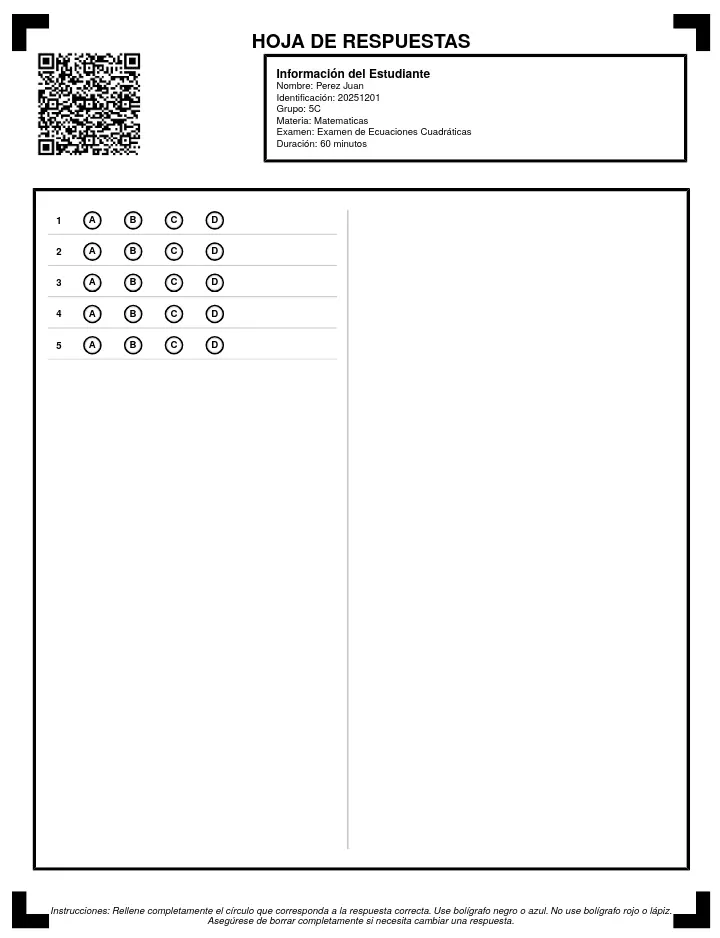
Each answer sheet has a unique QR code that identifies the student.
Location
The QR appears in the top-left corner of each answer sheet.
Information contained
The QR contains:
- Exam ID
- Student ID
- Group ID
- Verification code
The QR doesn't contain personal student data, only internal identifiers.
QR importance
The QR is essential for:
- Automatically identifying the student when scanning
- Linking answers to the correct exam
- Avoiding errors from manual assignment
Care
- Don't fold the sheet over the QR
- Don't scratch or stain the QR area
- Ensure the QR is visible when scanning
If QR is not detected
If the system doesn't detect the QR when scanning:
- Make sure the QR is complete in the image
- Verify it's not damaged or stained
- Try scanning again with better lighting
- As a last resort, manually assign the student